Showing posts with label apple. Show all posts

A View With iOS 7 Beta.! The Next Gen iPhone.


Thursday, July 11, 2013
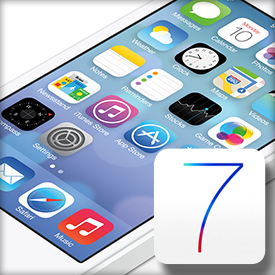
Apple's ios 7 Beta is out, smoothing and stabilizing Apple's new mobile operating system. It's still far from being ready for consumers, but it's also far from launch; I'm anticipating late September or early October, when the new iPhones and iPads come out.
To silence a growing chorus of discontent against an operating system design that's remained more or less static since 2007, Apple needed to go big. With iOS 7, it did.While there are a few notable new features in iOS 7, the new interface is by far the platform's deepest felt and most profoundly changed of the entire batch. Apple's other features are relatively uninspiring and do little to challenge competitors; however, we have a feeling that Apple is saving some major reveals for its next big iPhone announcement.
The number-one thing that strikes me about iOS 7 is: it's iOS. Most notably, it keeps iOS's central metaphor of the app grid, which sets it apart from the other major operating systems. Customization is still very strictly controlled, compared to Android and Windows Phone. You can shuffle around your icons and put them in folders, but all the information they can give you at a glance is a little red badge. For someone used to widgets and Live Tiles, it's stifling.
Apple has never created anything that looks like iOS 7 before. Never, ever. This is important, because many longtime Apple users were blindsided by the bold new look.As a company, Apple is known for many things. Design sits somewhere near the top of the list. Apple’s hardware is gorgeous and unparalleled, and its software is sleek and beautiful — even when it fails miserably.As rivals try desperately to catch up and as they spend billions on new product development, no notebooks are as sleek as Apple’s, no tablets are as striking as the iPad, and no smartphones are as stunning as the iPhone.
Few Noteworthy Points.
  • Unlock the phone, and icons drift down
  • Revamped weather app shows dynamic weather animations onscreen; pinch for all-city overview
  • Night mode for maps
  • iCloud photo-sharing
  • iCloud keychain remembers sensitive data
  • Long MMS support
  • Swipe from day to day in Calendar
  • Phone, FaceTime, and Message blocking
  • View PDF annotations
  • Activation lock to protect against theft
  • Support for 60fps video capture
  • Notification sync
  • Smart download for TV episodes
  • Smart mailboxes
  • Wi-Fi hotspot 2.0
  • Tweaked mail search
  • Inclinometer support
  • AirDrop from activity sheet
  • Background asset downloads
  • Per app VPN
  • Single sign-on for Enteprise


At its core, iOS 7 is a fundamental departure from earlier versions of iOS in terms of user experience. Historically, navigating iOS was very linear. Open an app, close an app. Open another app, close another app. iOS 7 is all about layers, however, and I have a feeling that this is something we’ll see Apple really start to run with in future versions of its mobile platform.
Navigating iOS 7 is different. Panels open on top of apps and transparency effects provide a unique visual reminder that other parts of the OS lie beneath the current view. Apple really built on this concept, too. For example, each key press on numbers in the new Phone app or on the lock screen provides a fleeting glimpse of the wallpaper that sits beneath the app. It’s a very cool effect that does not go unappreciated, and there many are other small design elements that show Apple is still a company that sweats the little things.
For the most part, iOS is still very logical and easy to use. There are areas where the interface falls apart a bit, but the “beta 1″ label says it all — many, many things will change before iOS 7 reaches the public this fall. In its beta form though, there are some real missteps in iOS 7 that are pretty shocking. Here’s one example:
Apple, a company defined by design and collectivesmarts, made a pretty elementary design snafu right on the iOS lock screen.
“Slide to unlock” sits near the bottom of the display on the lock screen and shimmers, as it always has. But the simple slider button graphic is now gone. Instead, just beneath the words “slide to unlock,” sits an arrow pointing upward. Sliding upward doesn’t unlock iOS though. Instead, this arrow is meant to alert the user to the presence of the new Control Center, which provides quick access to several settings and controls. To unlock an iOS device, the user still must swipe from left to right.
If you're a relatively lazy Android user - one who doesn't customize - iOS 7 is a great-looking alternative, one that spins in some of Google's better built-in features like notifications, quick settings and a touch of Google Now. If you love your widgets or Live Tiles, on the other hand, there's nothing for you here. As I said before: iOS 7 raises the game, but it doesn't change it. Of course, that may change - did I mention we're months away from launch?

Top 10 iPhone iPad Apps for College


Tuesday, May 15, 2012
Having an iPad is the most remarkable thing that one can hold. However, if you are in college, this device can help you in many ways than you can imagine. For one, one can use it in his studies; keep in touch with friends and family and also to keep records of everything from birthdays to class schedule. However, before you take it to college, you must find applications that will help you there. Therefore, below is a list of top 10 iPhone ipad applications that will help you.


10. Twitter


We all know that when a person goes to college there are going to become social oriented. Therefore, it will be a wise thing to be ready by downloading one of the leading social sites. When you do this, you will be you will be communicating with your friends who are far from you.

9. Friendly plus for Facebook


For now Facebook does not have an official iPhone iPad application, friendly plus for Facebook is the next big thing. This application will help you to get access to your profile, post and see post, view photos and all things that you can do with your account.

8. iBooks


This application grants users an e-book reader and access to the EBook marketplace. This application will help you a lot with your studies as you will gain access to various types of EBooks online. You will be able to do your researches properly and do your homework properly.

7. To-do for iPad


This application is the best task manager that one can have in your ipad. This application has features that make it easy for you to do things. This application is helpful especially when it comes to studies because it will remind you that you have assignments, giving out your work and so on.

6. Blackboard mobile learn


This application is good for people who are doing art. However, it does not mean that when you are not doing art you do not require it. The reason why people who are doing art require this application is that through half of their courses they will use blackboard application to download information. In general, this application is a means of sharing information.

5. Pages


This application is like word software for computer. However, it is the mobile word processor. It is a great thing to know that you can write information or notes using your phone and save it for later. Using your iPad as your notebook is a great thing. You should try this one day and experience the difference.

4. Penultimate


There are times that you will need to write something quickly, and you do not have the time to interact with your keypad, then one can write using their fingers when you have this application.

3. Wikipanion for ipad


This software is the best in writing essays. One can use this application on a daily basis.

2. Istudiez pro


This application is a task manager especially to people who are in college. This application has made it easy to great timetables, assignments and various reminder options that can help a student.

1. iAnnotate PDF


This application gives users many different colored highlighting tools. It takes PDF annotating to the next level.

What iPhone iPad applications do you use? Please let me know in the comment and I would very happy to comment.

This article was written by the best online colleges. If you would like to know more about iPad Apps for college, I encourage you to visit www.bestcollegess.com.

Why Apple using patent troll to sue all major smartphone manufacturers. Are they Dumb or smart?


Sunday, December 25, 2011

We all know Apple as the innovative face of the personal communications industry. With the rise of reliable and unlimited mobile broadband, the iPod, iPad and iPhone are rapidly becoming iconic devices in the same way as the Sony Walkman once was. But with success often comes the need to defend your intellectual property in the form of patents. But when does this desire to protect your investment descend into money-grabbing greed and bullying? Some say Apple is fast approaching this point with the employment of what are known as 'patent trolls'.

You may have seen the case recently in which HTC were sued by Apple over alleged patent infringements. In the end, they only could prove one infringement which should have little impact on HTC design. But a precedent was set, with BT suing Google over six alleged Android patent infringements and the potential for more litigation now that Google has acquired Motorola Mobility. Are we entering a mobile war and who will actually benefit from it?


If the rumours are to be believed, then it is the patent trolls such as Digitude Innovations who will gain. They are involved in acquiring patents for themselves by transfer under license from the owners. This then leaves then free to pursue anyone they want, including Apple, Motorola, BT, Microsoft and more. Size provides no immunity. They profit by pushing for large out-of-court settlements or by simply winning court cases.

Where this will end up is not known. But allowing and possibly actively encouraging these middle men to act on their behalf could be seen as an aggressive way to push the competition out of the way. It is a lot easier than out-marketing them, which costs billions of pounds a year to each company. If you can get a blanket ban on the sale of any phone with the infringing technology in the US especially, but also in Europe, they are effectively out of business. At the stroke of a pen your competition is dispensed with.

This may be unwise of Apple, because all of this could be seen as corporate bullying and intimidation, which might alienate customers. Moving to another company is simple, as those with reliable unlimited mobile broadband can easily switch phones and just upload all their links and favourites from online storage sites. Secondly, what if too many of the cases are lost, drag on and cost too much money? There is the real risk that Apple themselves might be on the receiving end of a successful patent case. What if their own devices get banned in certain markets?

It is a risky game that Apple is playing. Yes, they have to defend their patents or they lose them. But is employing this middle man as your brutal enforcer always the right or most efficient way to do it? Finally, could the time spent on pursuing these claims, whether justified or not, be better spent elsewhere? Apple is at a critical point. With the sad demise of Steve Jobs, a serial innovator and driver of success has been removed. They have to fill that void so they can continue to be a market leader. Can they do it while they are engaging in litigation in various courts around the world? Only time will give us the answer to this question.

About the Author: The above article is composed and edited by Eva k. She is associated with many technology and designing communities including Broadband Expert as their freelance writer and adviser. In her free time she writes articles related to unlimited mobile broadband , internet technology, mobile applications, etc.

Apple releases iTunes Match Today - Music Service with iCloud


Tuesday, November 15, 2011

Apple has launched iTunes Match today, as expected. You can check out the new features of it here. iTune Match from apple is a new service where you can legally access and store all your music on iCloud. Even those songs that you originally didn't even buy it. For $25 per year, you are eligible to store songs on icloud. Apple recently started its iCloud service and now its in full fledged action.

Read:Hostgator Hosting Coupon - 25% OFF November 2011

Logically speaking iTunes match should pair up with the legal songs ripped from your CD's but now itseems that even your pirated copies can be legally stored for $25 per year. And if you have a variety of bands might be rock, jazz, pop in your iTunes library, this can also be sync with the new iCloud service, this time apple has no issues with its privacy with pirated songs being uploaded onto iCloud.

The new service iTunes 10.5 allows users to share it on iCloud and access the same to all your apple devices with ease. The iCloud service lets you access and download past purchases, too, on whichever device you want.

Read:The iPhone 4S – could battery problems lead to an update?


The latest updates for iTunes match is available to the US customers only (sorry world), To enable these services you need to switch it on after iTunes is installed. Do we really need an iTunes and iCloud? How does it really matter for your apple devices?

Do you know what Google is up against with? Google Rivals -- Facebook, Apple, Microsoft, Amazon, Twitter


Sunday, November 6, 2011
Google one of the best and excellent search engine and web number one company. In spite of all its cool projects and product, its facing immense competition against very top new companies by these new youths and great product of theirs. No wonder its working round the clock and strongly to innovate new ideas and products and beat their rivals. Let talk about to which area these companies are competing against what?

1> Facebook:


We all love facebook no wonder in that, right! Even though there's no notification, we simply logon and close, I suppose its become a habit. That's the problem Google is facing, they are not able to find a way where users can shift their login places. People are so addicted to facebook like me, all because of one thing Social status of your life is online. Although Google has come up with its cracking products like the G+ or Google+ or Google plus. Its ad free, bu has seen traffic drops in recent times. But don't forget its the first new social network, which received a tremendous response.


2>Apple:


We obviously love Apple iProducts - iPod,iPhone,iPad,iTouch, Apple TV,Mac, iOS and not to forget its accessories. So, even though apple has the largest market share in mobile platform space, Google has come up with a strategy and conquering this mobile platform with its new Android mobility OS. Not to forget apple found Steve totally wanted this android OS to be killed as its a copied product, but as of now I think it can't be even touched. Its growing enormously strong and fast!

3>Microsoft:


Duh, microsoft? Previously when people choose microsoft products, they said WOW! But now they think theirs no other global alternative. For example its OS windows, no matter how much ever it looks good, ultimately what matters is performance, which I can say Windows just lags that. Hence Google comes with this cool project, which is Chrome OS. Its not yet released for public, but if you are willing to see what's inside it, you could give a try for its developer version.


4>Amazon:


Amazon is another cool marketing company which basically sells book, ebooks, kindle (pad) and many more. Google is trying to monetize this space too. With its new launch of trends and books, and scholar; its trying it hands on in this market.

5>Twitter:


Never ignore small things, like this one. Twitter has  potential to become a awesome company in the near future, why I say this because: People will and are having a short span of time and want to share limited and say just "Hi" or "Wassup?" and make a conversation fruitful. So, Google had came up with its Buzz which is currently going away, as its embedded into Google+ or google plus.


So, no wonder Google is trying so hard to make its way up and conquer the Internet! Ultimately no body can be King of Internet, its just all are part of it!

HOW TO: Install Mac OS X Lion? [tutorial]


Thursday, July 21, 2011
Mac OS X Lion is available in apple store. The costs you about $29.99 for an upgrade and $49.99 for a new package. Since mac is been around for a while with its stunning looks and efficient OS, this around with its ew launch of OS X Lion has some really killer features.
MUST: Apple announces Mac OS X Lion
mac os x lion

For USB Thumbdrives: Apple will be selling OS X Lion on USB thumbdrives in its stores in August for $69. You can buy several 8GB USB thumb drives for that price, for fun just burn your own Lion installer copy for safe keeping.
MUST: How to create android app for your blog?
os-x-lion
Step1: Download the Mac OS X lion from your Mac App Store.
mac os x lion
Step2: Click on the Mac OS X Lion, Right click show package contents
mac os x lion
Step3: You will see the contents, then click on the .DMG file as in Disk Image for further installation
mac os x lion
Step4: Then you get a Disk utility dialog box, then select the particular drive you may want to install. For users who want to create a DVD for installation purpose, just insert one on your Mac
mac os x lion
Step5: Click on the tab that says 'Erase' and locate the source image file.
mac os x lion
For destination, you need to choose the partition of which drive you want to use.
Caution: This will erase all the data on that particular drive, make sure that you do not have anything important on that drive.
Then Click 'Restore'. That;s about it your new Mac OS X Lion is ready and up- running!
MUST: Apple app store hits 500,000 apps

Apple Announces OS X Lion launching in July for $29.99


Tuesday, June 7, 2011
The World's most advanced desktop operating system advances even further. Apple being the developer of OS X for mac desktops, has announced its latest new OS X lion at the WWDC(World wide developer conference) which is going on from June 6th to10th of 2011.


Apple again meets the users expectation by launching their new OS X Lion. I always wonder why would Apple choose a name of cats` for their OS, as in previously was Snow lepord.

So what's new?

  1. Launchpad
  2. Full screen apps
  3. The Mac apple store
  4. Mission control
  5. Mail
  6. Multi-Touch Gesture
Apple says :"Changing the way you use your Mac. One feature at a time. People have been doing the same things on computers for years. Clicking. Scrolling. Installing. Saving. With OS X Lion, we’ve challenged the accepted way of doing things by introducing new features that change the way you use a computer."

Full screen Apps
Multi- Touch Gesture
Mac App Store

Features:

  1. Resume, where in Now apps you close will reopen right where you left off, so you never have to start from scratch again. And when you install software updates, you no longer need to save your work, close your apps and spend valuable time setting everything up again. With Resume, you can restart your Mac and return to what you were doing with all your apps in the exact places you left them.
  2. Auto save, now you do not need to worry about saving your document, just like you can auto save on internet mail and stuff, its now possible even offline.
  3. Versions, this is a new feature that charts the history of your documents, taking snapshots in time, and displaying them side by side with the latest versions in an easily browsable timeline. You can review the past iterations of your compositions, restore a previous version, or copy and paste from old versions to new ones. 

Although with lot of speculation around in technology, Apple announced its OS X Lion to be launched in July for $29.99 and Lion servers for $49.99. Sign up and receive an email the day OS X Lion is available for download.

Receive all updates via Facebook. Just Click the Like Button Below

▼

You can also receive Free Email Updates:

Powered By SlashBall Networks

Random Posts

Alexa